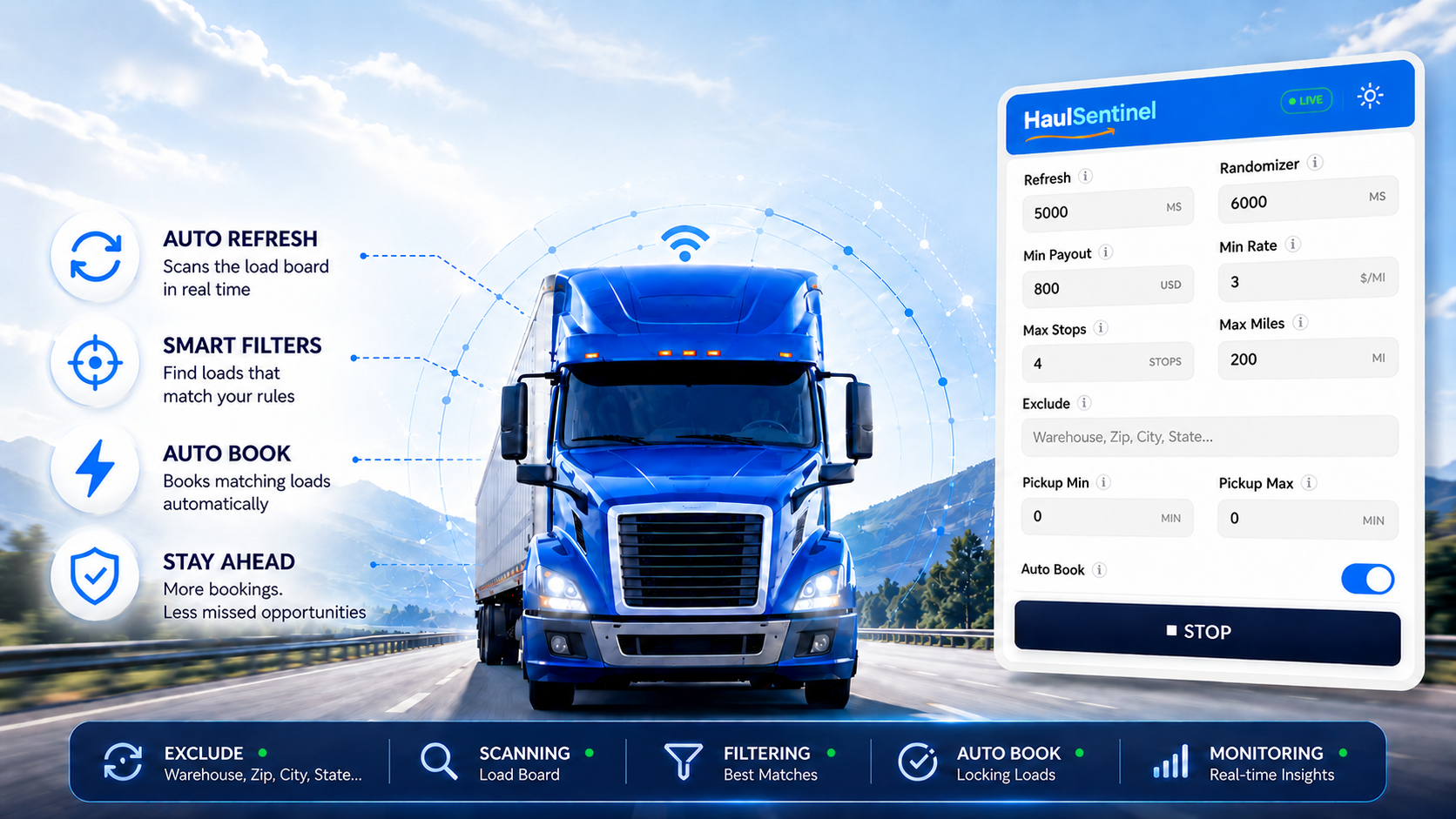
Chrome Extension · USA Amazon Relay Carriers

Stop staring at Amazon Relay
all day.

HaulSentinel watches the load board for you and alerts you the moment a route matches your filters — so you can step away from the screen without missing the load you were waiting for.

Join the early access list See how it works

For dispatchers, owner-operators, and small fleets.

Before START HaulSentinel popup with filters set and START button ready
After START HaulSentinel popup scanning live with STOP button visible

Built for the hours nobody wants to lose.

When the board moves,
HaulSentinel brings you back.

The point is not to automate recklessly. The point is to stop living chained to a screen — and still hear the moment a route deserves your attention.

The real cost of watching manually

Load hunting should not cost you your sleep.

Endless refreshing

Reloading the load board every few seconds, hoping a good route appears before someone else grabs it — and repeating that loop for hours.

Eye strain & screen fatigue

Hours staring at a screen that barely changes. By the time a good route appears, you're too drained to think straight about whether to take it.

Lost sleep

Good routes appear at 2 AM. You stay up watching because you're afraid to stop. The anxiety follows you to bed even when you finally close the screen.

Missed opportunities

Step away for five minutes — that is all it takes for the route you needed to disappear to another carrier who was watching the board at exactly that second.

Simple by design

Up and running in three steps.

No complicated setup. Open the extension in Chrome, tell it what you're looking for, and let it do the watching.

01

Set your filters

Enter your minimum payout, rate per mile, max miles, max stops, pickup time window, and locations to exclude. Takes under two minutes — and you only do it once.

02

Press START

HaulSentinel begins monitoring the Amazon Relay load board. Put your phone down, make coffee, rest your eyes. The extension keeps watching so you don't have to.

03

Get alerted — you decide

Sound plays, the route highlights on the page, Chrome sends a notification. You review it and decide what to do. HaulSentinel never acts without you — unless you enable Auto-Book.

The alert is the product

Set it once.
Let the alert bring you back.

HaulSentinel monitors continuously while you rest, work, or focus on something else. When a route matches, you get a clear signal — not another reason to keep the load board open all day.

Alert

Sound alert

A clear audio cue plays the moment a matching route appears. Step away from the screen — the sound brings you back only when something worth checking shows up. No constant watching required.

Visual

Visual highlight

Matched routes are highlighted directly on the Amazon Relay page in a distinct color. The moment you glance at the screen, you see exactly which load triggered the alert — no hunting through the list.

Browser

Chrome notification

Even in a background tab, Chrome surfaces the match as a system notification. You never have to keep HaulSentinel front and center — the browser pings you wherever you are.

Smart

Duplicate protection

Already-alerted routes are remembered for the session. You only hear about each matching load once — no repeated noise from the same route reappearing on the board every few seconds.

Why it feels different

Built for peace of mind, not reckless automation.

Most competitors sell speed first: refresh faster, click faster, book faster. HaulSentinel leads with control — alerts that let you rest, filters that reduce noise, and automation only when you explicitly choose it.

The usual pitch

More speed. More clicking. More pressure.

That may sound powerful, but for a carrier it can also feel noisy, risky, and hard to trust — especially when your Amazon Relay account is the business.

HaulSentinel

Alert-first monitoring you can actually live with.

Set your filters once. Walk away. A sound alert, visual highlight, and Chrome notification bring you back only when a route matches what you already said matters.

Optional automation

Auto-Book is a choice, not the identity.

Auto-Book stays off by default. The core value is peace of mind: fewer hours staring, fewer repeated alerts, and one clear STOP control when scanning is running.

Your criteria, precisely

Watch only for the routes
you actually want.

Tell HaulSentinel exactly what makes a route worth your time. Every alert you receive has already passed every filter you set.

Timing

Refresh

Set the base interval in milliseconds for how often HaulSentinel checks the load board. Fully in your control.

Timing

Randomizer

Adds a random millisecond offset per cycle so scans do not follow a perfectly predictable mechanical rhythm.

Financial

Minimum payout

Only alert on routes that meet or exceed your required payout. Anything below your threshold is silently ignored.

Financial

Minimum rate

Filter by minimum dollars per mile so every alerted route clears your rate floor — not just the gross payout number.

Route

Maximum stops

Set a maximum number of stops. Any route above your threshold is filtered out before the alert fires — no multi-stop noise.

Route

Maximum miles

Keep routes within your operational range. Any trip above your mileage cap is filtered out quietly before you ever see it.

Location

Exclude locations

Block warehouses, cities, states, or ZIPs you never want. Add them as chips — any route touching those locations is automatically filtered out.

Scheduling

Pickup time window

Define a min and max pickup time offset. Routes that pick up outside your schedule are ignored before they ever reach you.

Smart

Auto-Book (optional)

When you want faster action, Auto-Book attempts to book a route that passes all your filters — with six safety checks before every attempt. Off by default.

The actual extension

What you'll see in Chrome.

Open the popup, set your filters once, press START — then step away from the screen. One clear STOP button gives you full control back at any time.

Configure & start

HaulSentinel popup with all filters configured and the START button ready to press
Idle — filters set, waiting to start

Active — scanning live

HaulSentinel popup scanning live with LIVE badge and the STOP button visible
Live — one STOP button takes back control
Optional advanced control

Auto-Book when you want speed — with guardrails.

Auto-Book is not the whole product. It is an optional feature you enable when you want faster action on routes that already pass every filter — with hard safety checks before every booking attempt.

  • Requires your explicit enablement and risk acknowledgement.
  • Re-checks payout live before booking to confirm values are still within your limits.
  • Stops after your configured session booking cap is reached.
  • Can be disabled remotely if a serious platform issue arises.
Read the FAQ on Auto-Book risks →

6 safety checks — every booking

User enabled Auto-Book

Explicit consent + risk acknowledgement required first

All filters passed

Payout, rate, distance, stops, pickup window — all met

Exclusions cleared

No excluded locations found in the route

Payout re-read live

Values confirmed within limits before any click

Booking cap not reached

Within your configured session booking limit

Remote kill-switch clear

No stop signal active from HaulSentinel servers

HaulSentinel is not affiliated with Amazon and does not guarantee that Amazon permits automated tools. Users are responsible for how they use Auto-Book.
Safety & transparency

You stay in control. Always.

No mystery automation. No hidden behavior. HaulSentinel is built to assist you — not replace your judgment.

Clear STOP button

When HaulSentinel is running, one visible STOP button halts all scanning immediately. You are always one tap away from full control.

Auto-Book requires consent

Auto-Book is off by default and requires your explicit acknowledgement of risks before it can be enabled. It is never activated silently.

Single active scanning tab

Only one scanner tab runs at a time, reducing the risk of duplicate or conflicting automation on your Amazon Relay account.

Limited permissions

HaulSentinel uses only the permissions it needs — Amazon Relay and the HaulSentinel API. No access to your browsing history or unrelated tabs.

Diagnostics for support only

Telemetry is limited to reliability events used for support. Full load-board payloads are never stored or transmitted for any marketing purpose.

Remote kill-switch

Auto-Book can be disabled remotely if a serious platform safety issue is identified. A hard stop is always available beyond what you control locally.

FAQ

Questions, answered.

Is HaulSentinel affiliated with Amazon?

No. HaulSentinel is an independent product developed by JGS Transportation LLC, Elizabeth, NJ. It is not affiliated with, endorsed by, or connected to Amazon.com, Inc. or its subsidiaries in any way.

Does HaulSentinel guarantee I will get more loads?

No. HaulSentinel helps you monitor and respond faster to routes that match your filters. It cannot guarantee available routes, successful bookings, revenue outcomes, or any specific Amazon account outcome.

Does Auto-Book have risks I should know about?

Yes. Automated tools interacting with Amazon Relay may violate Amazon's Terms of Service or trigger account consequences. Auto-Book requires your explicit acknowledgement of these risks before it can be enabled. Only authorized account users should enable it.

Can I use the alerts without turning on Auto-Book?

Yes. HaulSentinel is designed around alert-first monitoring. Auto-Book is optional and off by default. You can run the extension indefinitely for sound alerts, visual highlights, and Chrome notifications — with Auto-Book never touched.

What data does HaulSentinel collect?

HaulSentinel stores your extension settings, trial or license status, an anonymized device identifier, and sanitized diagnostic events for reliability and support. It does not store full load-board payloads or transmit your Amazon Relay credentials to external servers.

Who is this built for?

HaulSentinel is built for Amazon Relay carriers operating in the USA — individual drivers, owner-operators, dispatchers, and small fleets who want to reduce the hours spent manually watching the load board.

What are the system requirements?

HaulSentinel is a Chrome browser extension for desktop. It requires an active Amazon Relay session in the same browser. Mobile browsers are not supported.

HaulSentinel · Early Access

Let the load board
come to you.

Set your filters, step away from the screen, and let HaulSentinel alert you when a matching route appears. Coming soon to the Chrome Web Store.